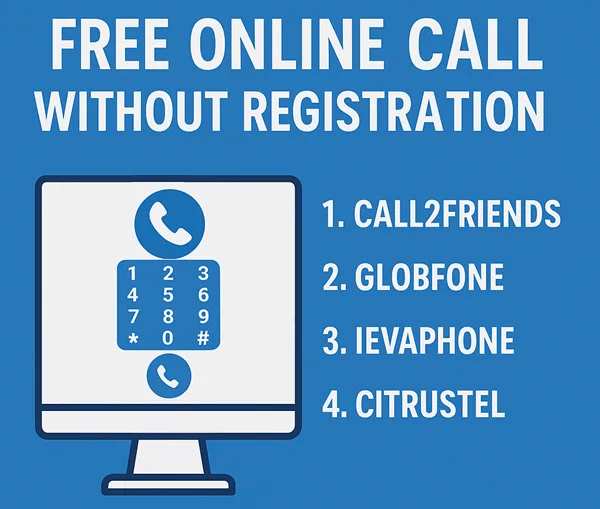
Hey Folks, In This Post I Will Share Some Top Websites, You Can Use to Make Free Phone Calls Online Without Download or Any Registration.
So Stick With it And Bookmark This Post So You Can Use Enjoy Free International Online Phone Calls with Unlimited Usage (Trick Regarding this At Bottom of the Post).
So With the Help of his article, you Can Make Free Online Call to Mobile From Your PC
Here We Listed the top Services for Free Online Calls to use Without Any Registration or Login.
Free Online Call Without Registration or any Download
We manually find these websites and distinguish between them and list them here so you can get the list of only working websites who are providing Free International Phone Calls Online Without Login.
We tested all of these websites, but some of them are Not Working in all Countries but working fine when calling from a different country.
If any of the websites listed here is Not Working Properly, Then Please Comment Below So we can Update the Post.
For People Who Like to Read More Detail Before Using then Here Is the Detailed info of All Websites listed above.
7. Spytox – Free Calls Online
Spytox Supports Almost every Country, and their Service is becoming popular because other websites in this niche are referring to it for Countries that they do not support. So Future pf this Website is Bright. So let’s talk about their services. They are Providing Free VoIP Calls, Free Sms, Email And Address Lookup By Name. When it comes to Call Limit Spytox is Providing Free 3 Minutes and 3 Free Calls a Day. And All Things Are Working Fine When We Tested this Website And it is Web-based Only.
| Extension or App: | Fully Web Based Only |
| Total Free Minutes: | 3 Minutes |
| Calls Per Day | 3 |
| Tracking By: | IP |
| Easy to use (out of 10): | 9 |
| Country Supported: | Almost All |
| Services: | VoIP Calls, Sms, Email And Address Lookup. |
| Working Status: | Working |
| Website : | Visit Now |
6. Poptox
POPTOX is the First Website that I find When I know about Free Calls Over the Internet. It is Working fine at that time, But for now, it does not support All countries it is Also Referring to Spytox for unsupported countries.
| Extension or App: | Fully Web-Based |
| Total Free Minutes: | Unknown |
| Tracking By: | IP |
| Easy to use (out of 10): | 9 |
| Country Supported: | Unknown |
| Services: | VoIP Calls Only |
| Working Status: | Not Tested |
| Website : | Visit Now |
5. WePhone
We Phone is only Available on Mobile App. If You Want To Use We Phone You Must Download and Install The WePhone App on Your Device. There is no need to register to use the app. You get 0.2$ credit for free So You can Make free Calls for Some Minutes. Rates for Call in Us is 0.00850$ per Minutes.
| Extension or App: | Mobile App Only |
| Total Free Credit: | 0.2$ |
| Tracking By: | IP |
| Easy to use (out of 10): | 9 |
| Country Supported: | Unknown |
| Services: | VoIP Calls Only |
| Working Status: | Working |
| Website : | Visit Now |
4. Citrustel
Citrustel is not Working For Some Countries So they refer to Spytox for that Country. Due to this We unable to To test Citrustel. They or offering Some Free Minutes For Trial purpose And if You Want To More Minutes you can Buy Credit too.
| Extension or App: | Fully Web Based |
| Total Free Minutes: | Unknown |
| Tracking By: | IP |
| Easy to use (out of 10): | 9 |
| Country Supported: | Unknown |
| Services: | VoIP Calls Only |
| Working Status: | Not Tested |
| Website : | Visit Now |
3. IEvaphone- Best From All
Ievaphone is my Favorite Website For Free VoIP Calling because you can use it in Android and iPhone also and make Free Calls Online Without Registration. When I am Testing This on Web it is not working and showing “There are no free minutes for direction. Come back later” But When I tested Their Android App, It Is Working Fine and the best thing is that you can also use this app without being Registered there. Initially, we get 4 Credits to use in the app. and Average Rates for India and Us is 1 Credit per Minute. Rates Are Changes with Country and Carrier. So With These Rates, We Have Nearly 4 Minutes For Call.
| Extension or App: | Web-Based and Mobile Application |
| Total Free Minutes: | 2-4 Minutes |
| Tracking By: | IP |
| Easy to use (out of 10): | 9 |
| Country Supported: | All(Tested For Indian Number) |
| Services: | VoIP Calls Only |
| Working Status: | The app is Working, But Web Based Not Working |
| Website : | Visit Now Download App |
2. Globfone
Globephone is Providing Many Services Related to Free VoIP Calls for Free. And the Good thing is that all the Services works on Your browser without installing any plugin or extension on your Internet Browser. To Make A Call Just open the website and click on Free call and give permission to it so you can communicate on call. that’s all you have done.
| Extension or App: | Fully Web-Based |
| Total Free Minutes: | Unknown |
| Tracking By: | IP |
| Easy to use (out of 10): | 8 |
| Country Supported: | Unknown |
| Services: | VoIP Calls, File Sharing, Video Call & Text Messages |
| Working Status: | Unknown |
| Website : | Visit Now |
1. Call2Friends – Free Calls Online Without Registration
Call2Friends is an Internet telephone service provider Offering Paid Plans and also Had a Free Call Option with Some Restrictions. Call2frand has a Very simple design just Go And Click On Free Call And You’re on Your Way. And there is No Need to Install any extra Plugin or Download anything to Make Call Via Internet.
| Extension or App: | Fully Web-Based |
| Total Free Minutes: | Unknown |
| Tracking By: | IP |
| Easy to use (out of 10): | 8 |
| Country Supported: | Unknown |
| Services: | VoIP Calls Only(Free or Paid) |
| Working Status: | Not Working In India |
| Website : | Visit Now |
How to Get Unlimited Usage On Free Calls
You are Gone Through the List Of Websites to make Free Calls Online Without Registration. All of them Are Providing Good Services And Free Calls By Limiting Call Duration Or Calls. But Calling only 2-3 Minutes is Nothing So For this Problem you Can Buy Credit From these Websites or Bookmark this Page and use these All Websites’ Free Minutes. So You Can Get 30-40 Minutes per Day Or Use the Proxies And Clear All Data And Use Again For Unlimited Minutes.
Miccesleonous:
Read More More About Internet Calls Without Registration?
Calling Internationally with our Mobile Operator is Costs us Too Much Money That’s the Moment Where VoIP or Internet Calls Comes. But Online VoIP Service Providers Also Demands Money (Less When Compared to Mobile Operators). But Some Free Services Are Also Available there. Here is List of Top 7 Websites for Free Phone Call Service Internationally
While Using These Websites to Make online Calls, You can do fun with your friends by Calling on Your Friend’s phone from an unknown number(anonymously) or from a mobile number with another country Or you can use these websites for many other purposes. But Let me tell you first that all these websites have limited usage. You cannot use these websites for free without being interrupted. So if you don’t want to interrupt and have a serious intention, then you may read Best VoIP Services To Buy.
Is Your Browser Ready to Use These free calling online?
So Let’s Comes to it if You are finding these FREE VoIP Services for Fun. But Before Going Forward to make Free International Calls online without Registration, Prepare Your Browser to use these Websites Properly.
Below are the little 2 Steps to Prepare Your Browser for Online Calling.
If You Already Installed Java and Flash Player and Disabled adblocker then You Can Skip(No need to Reinstall) this part And Move Forward Directly.
– Install Java and Adobe Flash Player
– Disable Adblocker
Popular Faqs
Final Words:
I Hope This Article is Useful For You and Helped You to Find the Best Website For You. if Any of the Website is Not working Please Comment Below So We can provide the up to date information to Next Reader by Updating this Post.